


Easy Lens by Snap Inc.
3.519.00 Reviews
App Specs
- Version
- 1.13.2
- Updated On
- License
- Free
- Downloads
- 100,000+
- Developer
- Snap Inc
- Categories
- Art & Design
- Platform
- Android
Screenshots
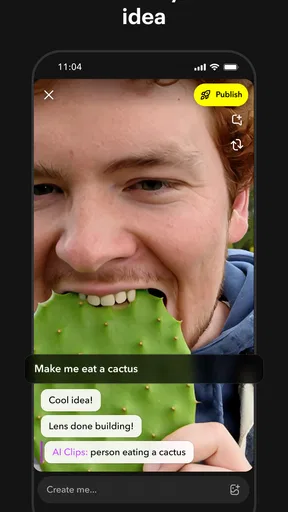
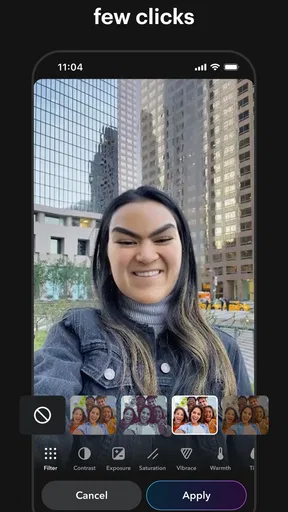
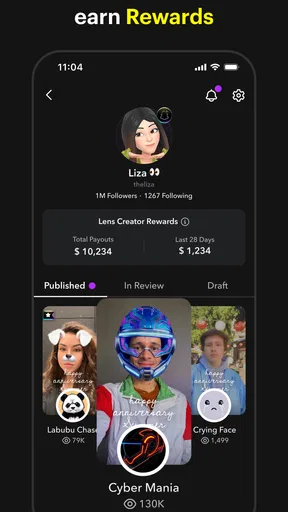
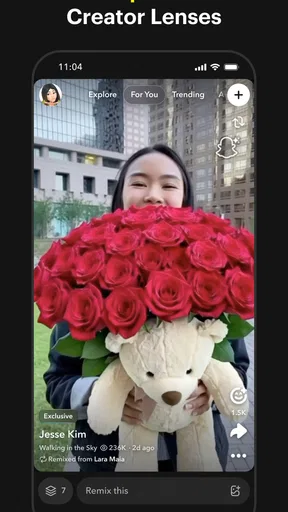
 Analysis by AppCompare
I approached Easy Lens as a practical creative tool rather than another camera novelty. It comes from Snap Inc and sits in the art and design category, with a simple purpose: help people discover, remix, and share Lenses created for different moments. That sounds narrow, but it becomes more useful once you treat it as a repeatable visual workflow instead of something you open only when you want a quick effect.
My first impression was that the app is aimed at lowering the barrier to Lens creation and experimentation. You do not need to begin with a blank canvas or understand every part of augmented-reality design before trying something. The appeal is in browsing ideas, making a variation, and turning a small concept into something you can use or show to other people. For casual creators, that is a friendlier starting point than a full design suite.
How I used Easy Lens from the first idea to a finished share
The most sensible baseline workflow is simple: open the app, explore the available Lenses, choose one that matches the kind of moment you want to create, and then look for ways to adapt it rather than starting over. I found this approach more productive than scrolling without a goal. Before opening it, decide whether you want a playful face effect, a visual treatment for a short clip, or an idea that could suit a particular event. A small intention makes the discovery area feel less random.
Exploration is central here, so the app works best when you pay attention to how a Lens behaves instead of judging it only by its thumbnail. A design that looks impressive in a still preview may be distracting when a person moves, while a quieter Lens can work well for repeated use. I recommend testing a candidate in the setting where you expect to use it. Indoor lighting, a busy background, and several people in the frame can change whether an effect feels polished or cluttered.
Remixing is where the experience becomes more interesting than a basic collection of ready-made camera effects. I would start with one element that already works and change only what supports the intended mood. If the original design has a strong visual identity, too many changes can make the result feel unfinished. Keeping a recognizable base while adjusting the presentation is a useful habit for beginners and also saves time for experienced users.
A realistic everyday example would be preparing a short birthday message for a friend. I might browse for a Lens with a celebratory feel, test it against a plain wall, and then make a restrained variation so the person remains the focus. I would record a few options, compare them away from the editing screen, and share the version that stays readable on a small phone display. The important step is not adding every available visual detail; it is checking whether the effect supports the message.
For a group, I would use a different process. First, I would test whether the Lens responds consistently when faces or objects move in and out of view. Then I would ask everyone to stand where the camera can recognize them clearly before recording. This avoids the common mistake of choosing an effect that looks fine with one subject but becomes confusing when several people enter the frame. Easy Lens is more enjoyable when you treat testing as part of creation, not as an afterthought.
Worth Reading Before You Choose

EA SPORTS FC Mobile 26 Is a Bigger Football Game, but It Takes Time

Flipboard Shows What News Apps Must Do Beyond the Feed

Switching to Android Auto Means Rethinking Your Driving Routine

Google Calendar Makes a Crowded Week Easier to Manage

Ludo King Makes the Most of the Minutes Between Plans

Baby Panda World Brings Quick Play to Modern Phones, but Its Game Library Feels Busy
The sharing stage also deserves a little care. A Lens may be fun inside the app but less effective when seen without your explanation. Before sending it to someone, I would watch the result once with the sound off and once at a smaller size. That quick check helps reveal whether the visual idea is understandable on its own. It is a small workflow improvement, but it separates a usable creation from a clip that only makes sense while you are holding the phone.
Settings that deserve attention before you create
I would not rush past the app’s available controls simply because the main attraction is visual. The most useful settings are the ones that reduce friction during repeated sessions: how you move through Lens discovery, how you preview a result, and how you handle a creation before sharing it. Rather than changing everything at once, adjust one choice, test it, and keep it only if it makes your process clearer.
For new users, the best setting habit is to establish a consistent preview routine. Use the same kind of lighting and framing when comparing several Lenses. Otherwise, you may mistake a change in the room for an improvement in the effect. This is especially important with art-focused tools, where color, contrast, and background detail can influence your decision more than the actual design.
I also recommend separating discovery from selection. Browse freely at first, but once you find a promising Lens, pause and test it several times instead of continuing to collect possibilities. Too much browsing creates a false sense of progress. A small shortlist is easier to evaluate, remix, and share than a long stream of half-considered choices.
Another useful habit is to decide where the finished result will go before you make it. If you are creating something for a private message, you can prioritize a personal joke or a narrow visual reference. If you are sharing more broadly, clarity matters more than complexity. Easy Lens gives you room to experiment, but it does not remove the need to make a judgment about audience and context.
The app is free to install, which makes this trial-and-error approach comfortable. It also includes in-app purchases priced at $8.99 per item, so I would pay attention whenever a creation path presents an optional purchase. The free starting point is enough to decide whether the workflow suits you. I would only consider spending money after identifying a recurring need, such as a particular type of Lens or a style you expect to use repeatedly, rather than buying impulsively during the first browsing session.
Easy Lens is rated for Everyone, which fits its approachable presentation. That does not mean every visual idea will suit every audience, however. I would still review a Lens before sharing it with children, colleagues, or a mixed group. The age label describes the app’s general suitability; it does not replace your own judgment about a specific creation or visual joke.
Repeatable patterns that make the app faster
Experienced use is less about discovering a secret button and more about building a reliable sequence. My preferred pattern is browse, test, narrow, remix, and review. Keeping those stages separate prevents the common problem of editing an effect before knowing whether its basic behavior works for your scene. It also makes it easier to return to an idea later without remembering every decision from the first attempt.
A second pattern is to create small variations instead of one ambitious version. Change one visual choice at a time, then compare the results. This gives you a clearer sense of what actually improved the Lens. It is particularly helpful when you are working with a friend, because you can explain why one version feels better instead of relying on a vague impression.
I would also keep a personal mental shortlist of dependable styles. For example, you might have one Lens that works well for close-up messages, another that suits outdoor scenes, and a third that remains readable in a group. The app becomes faster when you stop treating every session as a completely new search. You still discover new designs, but you have a dependable starting point when time is limited.
Shortcuts in this context are behavioral rather than hidden technical controls. Reuse a framing style that has worked, test under similar lighting, and decide early whether the effect should be the subject or merely an accent. These habits reduce wasted attempts without pretending that the app offers undocumented automation. They are simple, but they matter when you are making several versions for the same event.
One non-obvious trade-off is that remixing can make a Lens feel more personal while also making its original strength less obvious. If you modify too much, you may lose the visual balance that attracted you in the first place. I suggest saving your first usable version in your workflow before experimenting further. That gives you a reference point and prevents a promising idea from disappearing under layers of changes.
Another practical insight is to judge movement, not just appearance. A Lens can look excellent when you are still and become awkward when you turn, speak, or bring another object into view. I would make a short test with natural movement before committing to a longer recording. This is especially valuable for event clips, where repeating a failed take is more inconvenient.
For creators who share often, consistency can be more valuable than novelty. Using a recognizable visual approach across a small series can make the work feel intentional. Easy Lens is well suited to this kind of experimentation because its discovery and remixing model encourages you to begin with an existing idea and develop it. I would choose a clear visual theme and refine it gradually rather than chasing the most dramatic effect every time.
Where the creative freedom reaches its limits
The app’s accessible approach is also its main limitation. It is designed around Lenses and quick creative experimentation, not around the full control you would expect from professional art software, a detailed photo editor, or a dedicated video production tool. If you need precise layer management, advanced color correction, complex animation timing, or a carefully controlled export process, I would choose a more specialized application.
That distinction matters when deciding who should skip it. A professional designer building a client-ready campaign may appreciate Easy Lens for early ideas, but I would not make it the only tool in that workflow. Likewise, someone who wants a traditional drawing environment with brushes, typography controls, and extensive canvas options may find the Lens-centered approach too restrictive.
There is also a creative limit to remixing itself. Starting from existing Lens ideas makes experimentation approachable, but it can encourage results that feel similar to one another if you never introduce your own concept. I would use the app for visual thinking, quick social creations, and playful prototypes, then move to a broader tool when the idea needs a distinct identity or more exact control.
Performance expectations should be realistic as well. Visual effects depend on the scene in front of the camera, so a design may behave differently across lighting conditions, backgrounds, and subject movement. I would not judge the entire app from one poor test in a difficult room. At the same time, I would not ignore repeated inconsistency. If a Lens requires constant repositioning to look acceptable, it may not be worth using for a spontaneous moment.
The current version is 1.13.2 and the app requires Android 7.0 or later. That makes it relevant to many Android users, but compatibility alone does not guarantee that every phone will offer the same comfortable experience. I would install it on the device intended for recording and test the complete workflow there, especially if you plan to use it during an event rather than casually at home.
Its audience is already substantial, with over 100 thousand installs and an average rating of 3.5 from around 793 ratings. I read that as a sign of moderate interest rather than a reason to assume universal satisfaction. The rating suggests that the app’s value depends heavily on whether you enjoy Lens-based creation and whether its lighter workflow matches what you want. I would try the free experience before forming a strong opinion.
The developer is Snap Inc, which gives the app a clear connection to the wider Lens ecosystem. Even so, I would evaluate Easy Lens on its own workflow. A familiar developer name may make discovery easier, but it does not change the practical question: do you want a quick way to explore and adapt visual effects, or do you need a complete creative studio?
Who will get the most from it
I think Easy Lens is a good fit for curious beginners, casual creators, and people who want to make a visual message without learning a demanding design application first. It is also useful for anyone who enjoys comparing variations and refining a concept through short tests. If you like the idea of turning a ready-made Lens into something that feels more personal, the app offers a comfortable place to begin.
It can also suit small creative teams working informally. One person can explore ideas, another can test them on camera, and the group can decide which version communicates best. The process is lightweight enough for quick brainstorming, yet structured enough to prevent every idea from becoming an unedited experiment. I would use it for mood exploration, event content, playful invitations, and short social concepts.
I would recommend a different option to someone whose priority is precise illustration, professional retouching, long-form video editing, or complete control over every visual element. A conventional art app is better for drawing from scratch, while a dedicated editor is better for detailed finishing. Easy Lens is strongest in the middle ground between browsing inspiration and producing an immediately usable Lens-based result.
My verdict after building a repeatable routine
After using it with a more disciplined process, I see Easy Lens as a focused creative companion rather than an all-purpose art application. Its best quality is the way it turns discovery into a starting point for making. You can browse, test, remix, and share without needing to approach the task like a professional designer. That accessibility is meaningful, especially when the goal is a quick personal creation rather than a polished commercial asset.
The trade-off is that the same simplicity limits how far you can push an idea. The app rewards good choices about framing, audience, movement, and restraint more than it rewards endless adjustment. My strongest advice is to create a small testing habit: define the moment, shortlist a few Lenses, make controlled variations, and review the result at the size where people will actually see it.
For me, the free entry point makes Easy Lens worth trying if you already enjoy augmented-reality creativity or want an approachable way into it. I would not choose it as a replacement for a full art or editing suite, and I would be selective about optional purchases until the app becomes part of a regular workflow. But for quick, shareable visual ideas, Easy Lens is most convincing when you use it deliberately rather than endlessly scrolling.
Pros
- Quickly identifies objects
- plants
- animals
- and products through the camera.
- Simple interface makes visual searches easy for less technical users.
- Useful for translating text and recognizing signs while traveling.
- Can help discover related products and shopping information.
- Powered by Snap’s visual search technology and regularly updated features.
Cons
- Recognition results can be inaccurate with poor lighting or unusual objects.
- Some features may require an internet connection to work properly.
- Camera-based searches can raise privacy concerns for cautious users.
- Product results and availability may vary by country or region.
- May use noticeable battery and mobile data during frequent camera searches.
FAQs for Easy Lens by Snap Inc.
What is Easy Lens by Snap Inc.?
Easy Lens is a camera and visual-search style experience from Snap Inc. designed to make lens-based interactions easier to discover and use. Depending on the version and region, it may help users access augmented-reality effects, recognize visual elements, or interact with Snapchat-related features. Its exact tools can vary, so check the current store description before downloading and confirm that it is published by Snap Inc.
Is Easy Lens free to download and use?
Easy Lens is generally available as a free download, although some features may depend on Snapchat services, account access, internet connectivity, or optional in-app purchases. Free availability does not necessarily mean every lens, effect, or related feature is unrestricted. Before installing, review the Google Play Store or Apple App Store listing for current pricing, subscriptions, supported devices, and any regional limitations.
Does Easy Lens require a Snapchat account?
Whether a Snapchat account is required can depend on the specific Easy Lens version and the feature you want to use. Basic camera or lens functions may be available without signing in, while saving, sharing, synchronizing, or accessing Snapchat-connected content may require an account. If privacy is important, review the sign-in prompts and permissions before providing personal information.
What permissions does Easy Lens request?
Because Easy Lens is built around camera and visual features, it may request access to your camera and, in some cases, your microphone, photos, storage, location, or network connection. These permissions support functions such as capturing images, recording video, applying effects, and saving or sharing results. You can review or revoke permissions through your Android or iOS settings at any time.
Is Easy Lens safe and compatible with my phone?
Easy Lens should be downloaded only from an official app store and verified as being published by Snap Inc. Compatibility depends on your operating system version, phone model, camera hardware, and available storage. Augmented-reality effects can use significant battery, processing power, and mobile data. Keep your device updated, check the listed requirements, and avoid unofficial APK files or modified downloads.


